
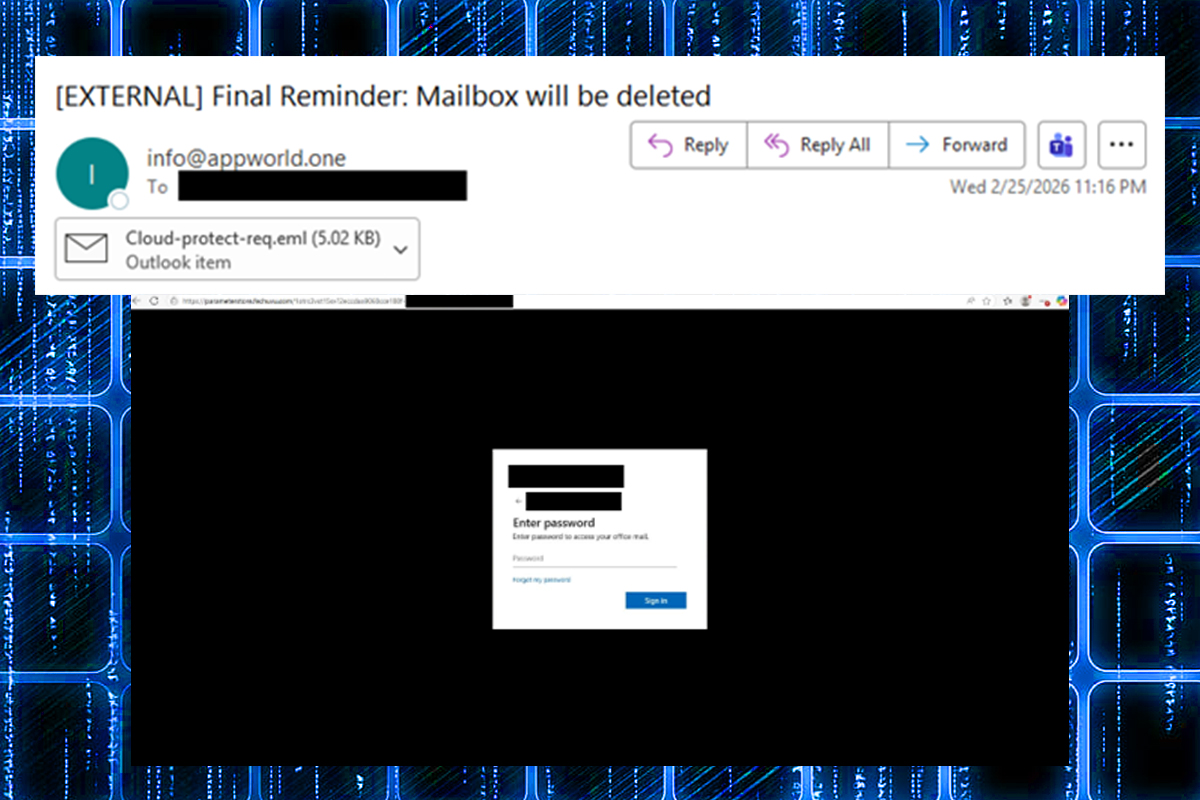
The NJCCIC observed a QR code phishing campaign targeting New Jersey State employees. Threat actors sent urgent messages claiming that the target’s mailbox would be deleted, without providing further instructions and leaving users with only the option to click the attachment. To bypass traditional email security filters, threat actors can hide malicious links within an image rather than as a clickable text link. In this campaign, they attached an EML file containing a PNG file with an embedded malicious QR code.
If the user scans the QR code with their mobile device, they are directed to a fake Microsoft authentication page whose domain (hxxps://parameterstore[.]fechuvu[.]com) is not associated with the target’s organization. The phishing page impersonates the target organization by including their logo and branding and embedding a Google Maps image of the organization's specific work location in the background, creating a false sense of trust and increasing the scam's effectiveness. It also prepopulates the user’s email address to trick them into providing their password, multi-factor authentication (MFA) code, associated session cookies, and sensitive information.
Recommendations
- Exercise caution with unexpected or unsolicited communications.
- Confirm requests from senders using contact information obtained from verified, official sources before taking action, such as clicking links, scanning QR codes, or opening attachments.
- Use email security tools that can scan embedded images for malicious QR codes.
- Enter official website URLs manually into your browser and submit sensitive information only on official websites.
- Keep systems and browsers up to date.
- Report malicious cyber activity to the NJCCIC and the FBI's IC3.