

The NJCCIC observed a phishing scheme that illustrates how cybercriminals exploit organizational trust to deliver remote monitoring and management (RMM) software. By impersonating trusted senders, such as internal Human Resources and Finance departments, attackers send deceptive emails that trick employees into running unauthorized software.
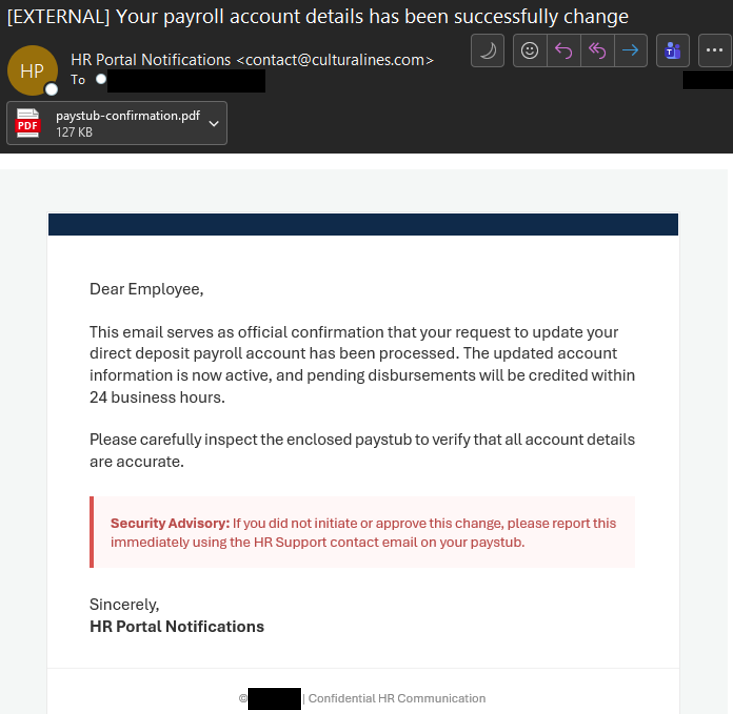
This phishing campaign begins with a message disguised as a routine administrative notification. Threat actors impersonate trusted senders, such as “HR Department Manager” (contact[@]spilworld[.]com) or “Finance Payroll Team” (contact[@]modalservice[.]com). Using subjects like “Action Required: Payroll Account Update” or “SECURITY ALERT: Direct Deposit Update,” the messages create a sense of urgency about purported changes to direct deposit details.
To bypass email security filters, the messages include an Adobe PDF attachment containing a URL that, when clicked, downloads a zipped Visual Basic Script (VBS) file. Once opened, the VBS script fetches and executes a Windows Installer (.msi) package for ScreenConnect, a legitimate RMM tool. The installer configures itself to run automatically at Windows startup, granting the attacker persistent, remote access to the compromised machine.
Using legitimate RMM tools—often referred to as Living Off the Land (LOTL)—allows threat actors to blend in with normal network traffic. Because security tools frequently trust signed installers like ScreenConnect, the payload often evades traditional anti-virus detection.
Recommendations
- Exercise caution with communications from known senders or legitimate platforms.
- Confirm requests from senders via contact information obtained from verified and official sources before taking action, such as clicking on links or opening attachments.
- Navigate directly to legitimate websites and verify before submitting account credentials, providing personal or financial information, or downloading files.
- Enable MFA and keep systems and browsers up to date.
- If sensitive information was entered, change passwords for compromised accounts, monitor for unauthorized activity, and review the Identity Theft and Compromised PII NJCCIC Informational Report for additional recommendations and resources, including credit freezes.