The NJCCIC observed a phishing campaign impersonating UPS delivery notifications. These messages use subject lines such as “Parcel Arrival Notification,” “Your Package Is Ready for Pickup,” and “Your Parcel Has Arrived” and are purported to be from the following sender(s):
- "UPS Parcel Services" <contact[@]shipfasts[.]com>
- "UPS Delivery Support" <contact[@]learnstax[.]com>
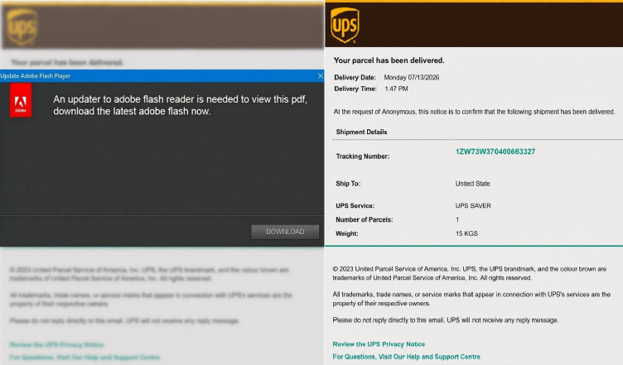
Messages include an Adobe PDF attachment that uses UPS branding and the UPS logo to appear legitimate. They claim the user needs to update Adobe Flash Reader to view the file. Clicking the download button triggers a Visual Basic Script (VBScript) to download and run.
The script executes a curl command to download the Microsoft Installer (MSI) package for installing ScreenConnect. This setup enables autorun at Windows startup. After installation, a benign PDF is displayed to the user.
Recommendations
- Avoid clicking links and opening attachments in unsolicited emails.
- Confirm requests from senders via contact information obtained from verified and official sources.
- Users are advised to only download applications and software from official sources.
- Maintain robust and up-to-date endpoint detection tools on every endpoint.
- Consider leveraging behavior-based detection tools rather than signature-based tools.
- Review the Don’t Take the Bait! Phishing and Other Social Engineering Attacks NJCCIC product for more information on common phishing and social engineering attacks.