

The NJCCIC observed a phishing campaign that uses spoofed financial notifications to deliver remote monitoring and management (RMM) software to victim systems. By masquerading as legitimate payment confirmations, the campaign misleads recipients into executing multi-stage payloads that ultimately lead to unauthorized system access.
The attack relies on fake payment alerts sent from domains that mimic corporate communication channels, such as doruxanimo[.]com and lenixarion[.]com. These messages may include the following details:
- Sender Display Names: "Michael Garcia" and "EFT Payment Alert"
- Subject Lines: "Funds Transferred Notification," "Payment Confirmation," and "Payment Sent"
- Attachments: payment-remitted.pdf and Payment-Remitted.pdf
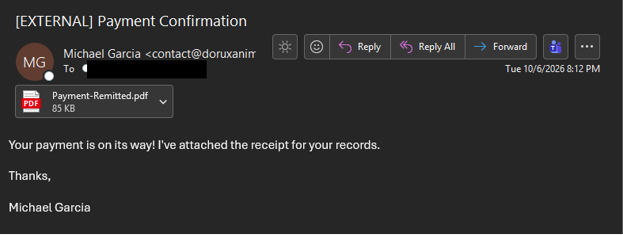
The phishing email contains a PDF attachment designed to bypass basic email security filters that block executable files directly. The attack progresses through the following sequence:
- The victim opens the PDF attachment, which contains embedded links or call-to-action buttons that redirect the user to a remote URL.
- Accessing the URL downloads a compressed .zip archive containing an HTML Application (.hta) or VBScript (.vbs) file.
- The user unpacks and runs the HTA or VBS file, and the script then requests a download of a Windows Installer (.msi) package.
- The MSI package silently installs Action1, a legitimate commercial Remote Monitoring and Management tool.
Although Action1 is an enterprise-grade administration tool, its unauthorized installation gives attackers persistent, high-privilege remote access to the host. Abuse of legitimate RMM software, often referred to as "Living off the Land," enables threat actors to execute commands, deploy secondary payloads, and exfiltrate data while evading detection by standard antivirus solutions.
Recommendations
- Exercise caution with communications from known senders or legitimate platforms.
- Confirm requests from senders via contact information obtained from verified and official sources before taking action, such as clicking on links or opening attachments.
- Navigate directly to legitimate websites and verify before submitting account credentials, providing personal or financial information, or downloading files.
- Enable multi-factor authentication (MFA) and keep systems and browsers up to date.
- If sensitive information was entered, change passwords for compromised accounts, monitor for unauthorized activity, and review the Identity Theft and Compromised PII NJCCIC Informational Report for additional recommendations and resources, including credit freezes.