
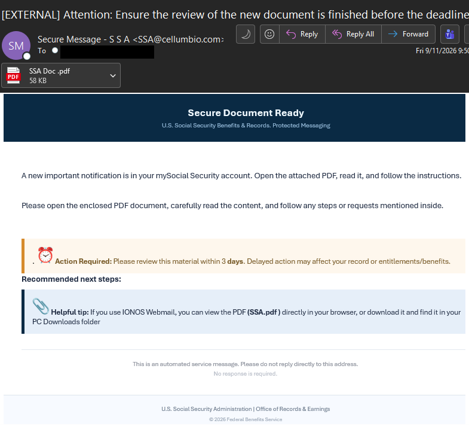
The NJCCIC observed a campaign that lures targets with emails that masquerade as official notifications from the US Social Security Administration (SSA). The email header urges recipients to complete a document review before a tight deadline, claiming a new notification is waiting in their "mySocial Security account." To create pressure, the message uses artificial urgency, instructing users to review the material within three days or risk affecting their records or entitlement benefits.
The target receives an email with an Adobe PDF attachment named "SSA Doc .pdf." Opening the PDF file reveals instructions to click an embedded link. Clicking the link downloads a malicious batch file, often named "SSA _Document Viewer.bat." If the recipient executes the batch script, it secretly installs ScreenConnect, a legitimate Remote Monitoring and Management (RMM) tool.
Once ScreenConnect is installed, the attackers gain full, persistent administrative access to the user's computer, enabling them to move laterally across the internal network, exfiltrate sensitive data, or deploy additional malware.
Recommendations
- Exercise caution with communications from known senders or legitimate platforms.
- Confirm requests from senders via contact information obtained from verified and official sources before taking action, such as clicking on links or opening attachments.
- Navigate directly to legitimate websites and verify before submitting account credentials, providing personal or financial information, or downloading files.
- Enable multi-factor authentication (MFA) and keep systems and browsers up to date.
- If sensitive information was entered, change passwords for compromised accounts, monitor for unauthorized activity, and review the Identity Theft and Compromised PII NJCCIC Informational Report for additional recommendations and resources, including credit freezes.