
Individuals and businesses may use trusted accounting software to keep track of finances, generate invoices, and run payroll. Accounting software can also automate bookkeeping, create reports, analyze financial trends, and organize and manage data, making tax season easier. The software is linked to a designated bank account to securely pull transactions automatically and update them regularly. Although accounting software can be convenient, there are potential risks to the security of financial information, such as accounts vulnerable to data breaches, unauthorized access to accounts, and data modification. Threat actors may also phish for credentials or sensitive information, steal funds, and install malware, including ransomware. Since the beginning of 2025 and continuing into tax season, the NJCCIC observed an uptick in threat actors exploiting trusted accounting software through impersonation, phishing emails, account compromises, fraudulent invoices or transactions, and fake manual software patches.
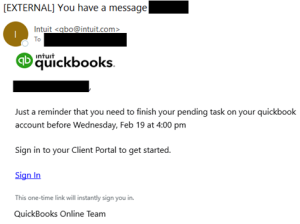
The NJCCIC’s email security solution identified multiple phishing and malware campaigns impersonating legitimate businesses related to accounting, tax filing, and payments. Threat actors can sign up for free accounts for legitimate services and target victims from within those services, utilizing email addresses from domains not flagged by typical security tools. In one phishing campaign, threat actors impersonated Intuit QuickBooks, using their branding and the legitimate sender’s domain name. However, the emails are suspicious because they contain phishing links to non-Intuit domain names, unlike official emails that always include links to “intuit.com” addresses. The phishing links prompt a fraudulent Intuit authentication page to harvest user credentials that can be used in account compromises.
Additionally, the NJCCIC received multiple reports of unauthorized users logging into QuickBooks Online accounts using the victim’s compromised account credentials. The unauthorized users updated existing and added new vendor accounts with their own Automated Clearing House (ACH) information. They then made payments to these vendor accounts, with some successfully deducted from the victim organization’s bank account and some failing due to insufficient funds to cover the transactions.
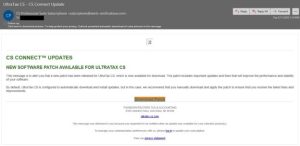
Threat actors targeted accounting firm employees and impersonated UltraTax CS, Thomson Reuters’ professional tax preparation software. The username in the sender’s email address was misspelled as “subcriptions.” Although UltraTax CS is configured to automatically download and install updates by default, the email recommended manually downloading and installing the supposed software patch. If clicked, potential victims were directed to a malicious link in which threat actors weaponized the legitimate ConnectWise ScreenConnect remote access software to connect to computers and send malicious commands remotely.
Recommendations
- Refrain from responding to unsolicited communications, clicking links, or opening attachments from unknown senders.
- Exercise caution with communications from known senders.
- Confirm requests from senders via contact information obtained from verified and official sources.
- Navigate directly to official and verified websites by typing the legitimate URL into the browser instead of clicking on links in messages and refrain from entering login credentials, personal details, and financial information on websites visited via links delivered in messages.
- Safeguard your information and accounts, including account credentials and other sensitive information.
- Use strong, unique passwords for all accounts and enable MFA where available, choosing authentication apps or hardware tokens over SMS text-based codes.
- Restrict access based on assigned user roles to ensure only authorized users can view or modify financial information.
- Keep systems up to date and apply patches after appropriate testing.
- Monitor accounts, set up alerts, review account transactions and activity, and report any suspicious activity, identity theft, or fraud to your financial institution, local police department, the FTC, or the credit reporting bureaus.
- Report phishing emails and other malicious cyber activity to the FBI's IC3 and the NJCCIC.