
Scalable Vector Graphics (SVG) image files are commonly used for legitimate web graphics and marketing purposes. Unlike JPEG or PNG files, SVG files are written in XML and support JavaScript and HTML code. They can contain scripts, hyperlinks, and interactive elements, which can be exploited by embedding malicious code within harmless SVG files. Although this tactic is not new, SVG files have become a common attack vector for cross-site scripting (XSS), phishing campaigns, and remote code execution (RCE) since the beginning of 2025. Threat actors increasingly leverage these weaponized SVG files to bypass traditional security filters, reach intended targets, and initiate credential harvesting and multi-stage malware infections. In multiple cases, these SVG files are not flagged as malicious in various anti-virus engines and threat intelligence platforms. These campaigns may also use advanced evasion tactics to ensure execution is only in non-sandboxed, real-user environments.
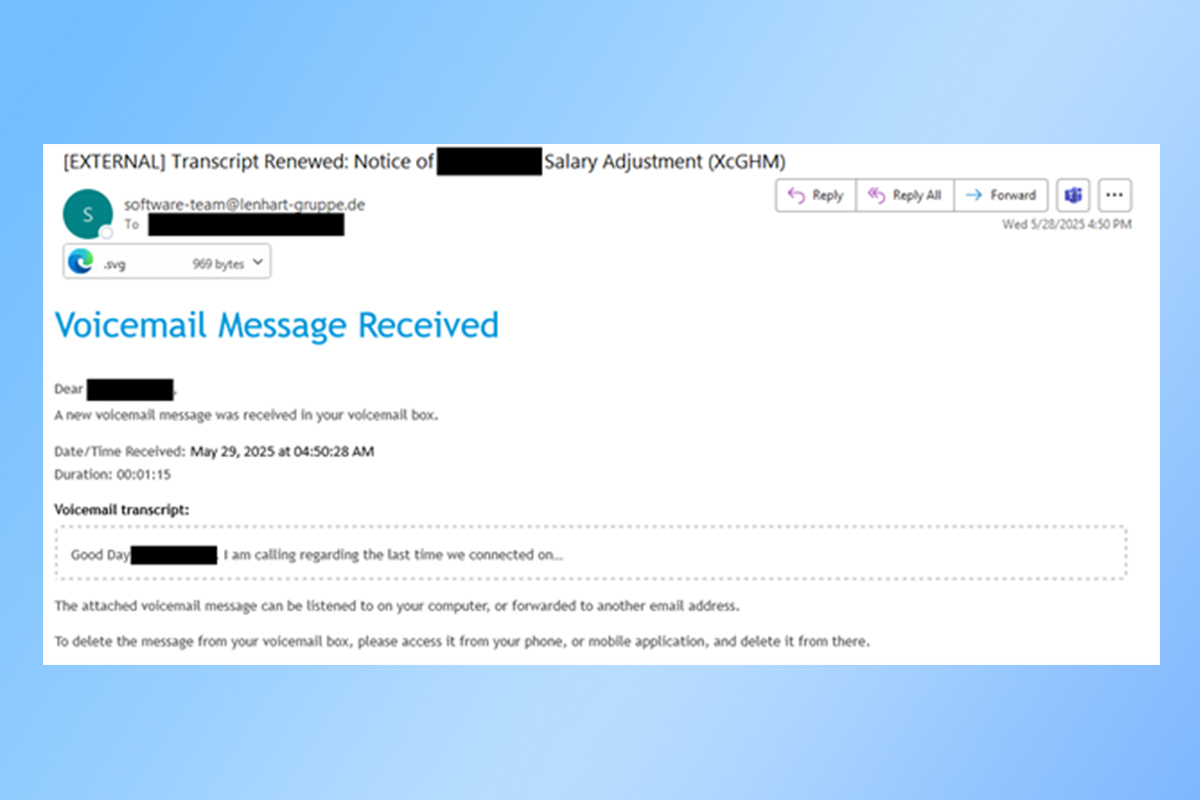
The NJCCIC’s email security solution detected an uptick in multiple phishing campaigns using SVG files. In one campaign, threat actors use lures of salary adjustment notifications via voicemail messages. Typically, human resources (HR) notifications originate internally from within an organization’s domain or network and are not communicated through voicemail messages.
The malicious message has an EXTERNAL tag with a top-level domain (TLD) for Germany, and the sender’s display name references “software-team” instead of an internal HR department. The voicemail transcript in the email displays the first part of the message, which is conveniently truncated and vague, to convince users to click on the attached unnamed SVG file to listen to the entire voicemail message. ]js” downloads and executes, potentially putting sensitive information and devices at risk.
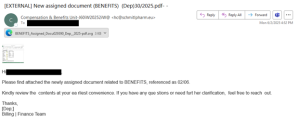
In another HR-themed campaign, threat actors send phishing emails with an EXTERNAL tag with a TLD for the European Union. The emails reference the “Compensation & Benefits Unit” in the sender’s display name, which differs from the “Billing | Finance Team” in the email signature. The subject line indicates an attached PDF file in the message but is disguised as an SVG file. The messages contain a thumbnail lure of the attachment to persuade users to click on the SVG file. If clicked, users are directed to a malicious website with a TLD for Tanzania that could not be displayed in a sandboxed environment.
Additionally, threat actors weaponized SVG files and targeted financial institutions across multiple regions using SWIFT -themed lures. When executed, it drops a ZIP archive containing a JavaScript file to download a Java-based loader. If Java is present, it deploys malware such as Blue Banana RAT, SambaSpy, and SessionBot. The malware abuses legitimate infrastructure, such as Amazon S3 and Telegram, for payloads and Command and Control (C2) communications.
Threat actors also utilized SVG files and targeted users in a credential phishing campaign. If clicked, the SVG file executes JavaScript code that loads a webpage, presents a CAPTCHA window, and directs targets to a fake Microsoft login page prepopulated with their email address. If they enter their password, it will be sent to the threat actors in the background.
Recommendations
- Refrain from responding to unsolicited communications, clicking links, or opening attachments, such as SVG files, from unknown or untrusted senders.
- Exercise caution with communications from known senders.
- Confirm requests from senders via contact information obtained from verified and official sources.
- Type official website URLs into browsers manually and only submit account credentials and sensitive information on official websites.
- Use strong, unique passwords for all accounts and enable multi-factor authentication (MFA) where available, choosing authentication apps or hardware tokens over SMS text-based codes.
- If the account has been compromised, log out of all devices, revoke any access tokens, and reset passwords.
- Keep systems and browsers up to date.
- Report these fraudulent scams and other malicious cyber activity to the FBI’s IC3 and the NJCCIC.